MicoVIO Visual-Inertial Odometry Sensor — User Manual
The MicoVIO is MicoAir's visual-inertial odometry (VIO) module: a global-shutter camera, an IMU and a ToF rangefinder in a 29.5 × 29.5 × 15 mm aluminium case, with all the fusion done on board. It outputs the aircraft's relative position, 3-axis velocity and attitude as standard MAVLink 2 ODOMETRY messages, so an ArduPilot or PX4 drone can hover and hold position without GPS — indoors, under bridges, in tunnels and warehouses, or anywhere satellites fail — and, on firmware that supports external-navigation missions, fly waypoints and return to launch. Typical trajectory error is 1 % of distance flown. It weighs 16 g and needs nothing but a spare UART.
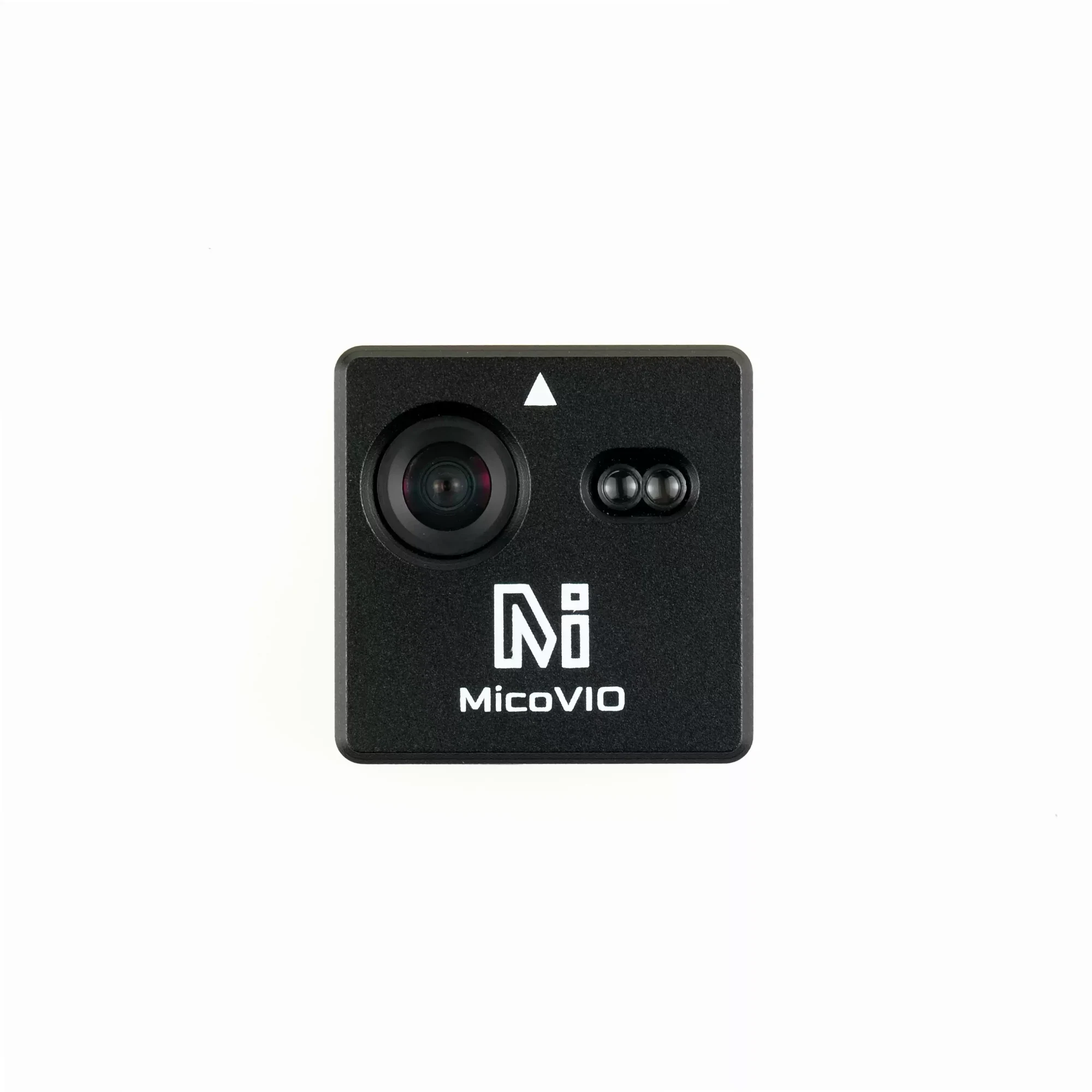
MicoVIO launched in China on 15 October 2026 and the first North American stock is on its way to Robofusion. The store page is live for reference, and the cart stays closed until units arrive. To reserve one, email info@robofusion.net with the quantity. Reserving costs nothing; ordering, payment and shipping details are confirmed by email when stock arrives. The first batch ships from our Hong Kong facility (later batches from our Canada and US warehouses), so delivery time and any import charges differ from the store-wide US-warehouse notice — they are confirmed in your order email.
Where to buy
- Robofusion store (ships from Canada — free Canada-wide shipping): MicoAir MicoVIO — pre-orders by email until the first batch lands.
- Not sure whether you need VIO or optical flow? Read VIO vs Optical Flow — what's the difference? first.
What VIO is — and why it is not "better optical flow"
An optical flow sensor watches the ground slide across a tiny camera and tells the flight controller how fast the aircraft is moving sideways. The EKF integrates that velocity to get a position, and because every small error is integrated too, the position drifts. Flow quality also collapses when the aircraft yaws quickly or climbs too high.
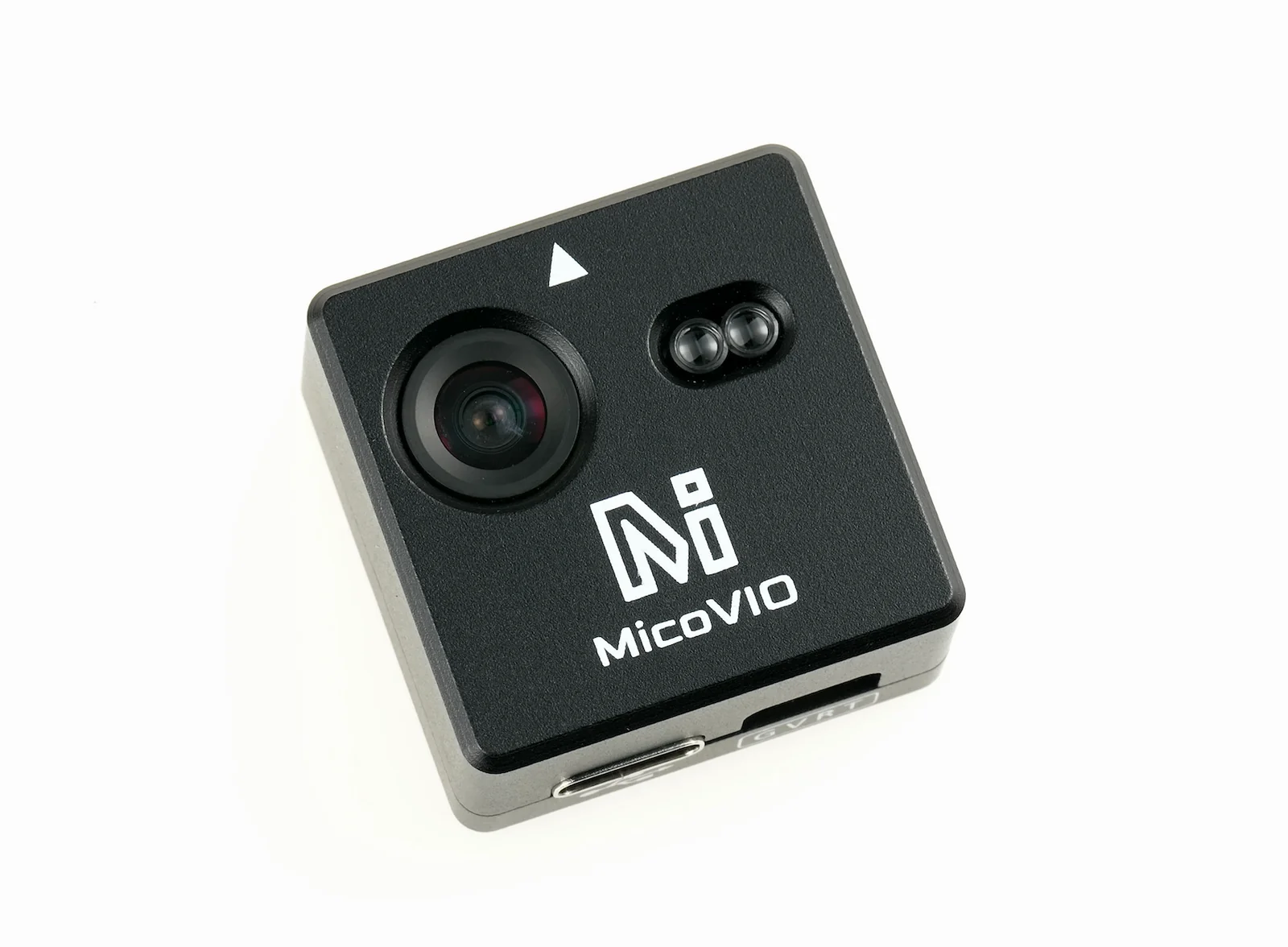
Visual-inertial odometry solves a different problem. It tracks hundreds of visual features from frame to frame, predicts the motion between frames with the IMU, and fuses the two into a full 6-degree-of-freedom pose — where the aircraft is, how fast it moves, and which way it points. The ToF rangefinder pins down the metric scale. The result is a position the autopilot can trust, not just a velocity. MicoVIO adds local loop closure: it re-matches the current view against recent frames and uses that as a position constraint, so a hover stays put instead of slowly wandering.
Open-source VIO pipelines normally run on a Linux board (Jetson, Raspberry Pi, VOXL) with a stereo camera and ROS, and they are notorious for diverging when the light changes or the aircraft is bumped. MicoVIO runs the whole pipeline on the module and holds through strong light changes, impacts and fast attitude changes — which is what makes a 16-gram, plug-into-a-UART VIO sensor possible at all.
Standalone: the whole VIO pipeline in 16 grams — no companion computer
This is the point that matters most. Until now, giving an open-source drone visual-inertial odometry meant building a small computer onto it, in one of two ways. Either a stereo camera such as the Intel RealSense D435 / D455 feeding a Raspberry Pi, Jetson or similar single-board computer that runs the VIO software (OpenVINS, VINS-Fusion) under ROS; or the Intel RealSense T265, which did the tracking on the camera itself but still needed a companion computer to bridge its pose into MAVLink for the flight controller. Either way the stack costs several hundred dollars, weighs well over a hundred grams with its cabling, needs a frame big enough to carry it, and takes days to integrate — and the open-source VIO in the first case is known for diverging when the light changes or the aircraft is bumped.
MicoVIO puts the camera, the IMU, the rangefinder and the fusion processor inside one 29.5 × 29.5 × 15 mm, 16 g module and talks to the flight controller the way a GPS does: one 4-pin UART cable, standard MAVLink 2. There is no operating system to install, no ROS, no SDK, no calibration routine and nothing else to power. A 3-inch quad can carry it. For the flight controller it is simply an external navigation source — the same VISO_TYPE / EKF2_EV_CTRL settings used for a motion-capture system or a VOXL — so an ArduPilot or PX4 aircraft that has never had GPS-free positioning gets it in an afternoon.
| Traditional VIO stack | MicoVIO | |
|---|---|---|
| Hardware | Stereo camera (D435 / D455) + Raspberry Pi / Jetson + power + cabling; or a T265 + companion computer as MAVLink bridge | One module |
| Weight | Well over 100 g all-in | 16 g |
| Cost | Several hundred dollars | A fraction of that |
| Software | ROS, VIO package (or the T265 SDK), MAVLink bridge, calibration | None — MAVLink 2 out of the box |
| Interface to FC | MAVLink over serial or Ethernet from the companion computer | 4-pin UART, 921600 baud |
| Robustness | Open-source VIO often diverges under light changes or impacts | MicoAir reports stable tracking through strong light changes, impacts and fast attitude changes (manufacturer claim; see Operating limits) |
| Minimum airframe | Typically 5-inch and up | 3-inch and up |
Specifications
Positioning & tracking
| Item | Specification |
|---|---|
| Method | Visual-inertial fusion of camera + IMU, with ToF rangefinder for height and scale |
| Output | Relative position, 3-axis velocity, attitude, height above ground, positioning quality |
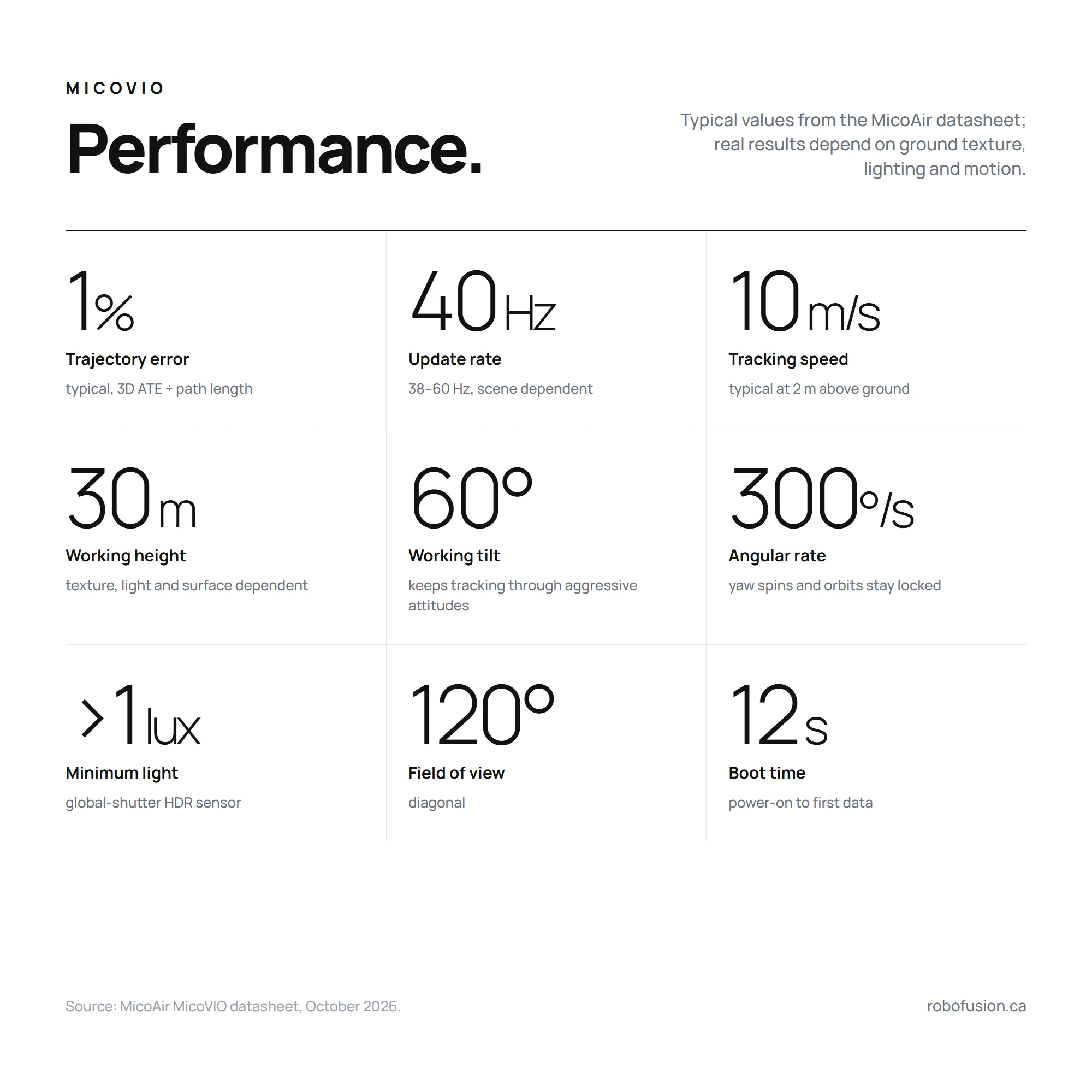
| Trajectory error | 1 % typical¹ |
| VIO update rate | 40 Hz typical (38–60 Hz, varies with scene texture) |
| Tracking speed | 10 m/s typical at 2 m above ground; varies with height, light, texture and motion |
| Max VIO working height | 30 m; effective height depends on ground texture, lighting and reflectivity |
| Min. initialisation height | 1 cm² |
| Max working tilt | 60° |
| Max tracking angular rate | 300°/s |
| Local loop closure | On by default; improves hover accuracy, does not affect dynamic flight |
| Boot time | ≈ 12 s from power-on to first data |
Vision & ranging
| Item | Specification |
|---|---|
| Image sensor | Large-format, high-dynamic-range global-shutter sensor with a fast wide-angle lens |
| Lens FOV | 120° diagonal |
| Illumination | > 1 lux |
| ToF range | 0.02–12 m — 12 m indoors or under overcast sky, about 8 m in bright sunlight³ |
| ToF update rate | 43 Hz |
Interface & protocol
| Item | Specification |
|---|---|
| Protocol | MAVLink 2 |
| Odometry message | ODOMETRY (ID 331) |
| Range message | DISTANCE_SENSOR (ID 132) |
| Serial | 3.3 V LVTTL UART, 921600 baud, 8N1 |
| Connectors | GH1.25-4P (GND · VCC · RX · TX) to the flight controller · USB Type-C for setup |
| Firmware | ArduPilot ≥ 4.5.2 · PX4 |
Electrical & mechanical
| Item | Specification |
|---|---|
| Supply | 5 V |
| Current / power | ≈ 200 mA average · ≈ 1 W |
| Size | 29.5 × 29.5 × 15 mm |
| Weight | 16 g |
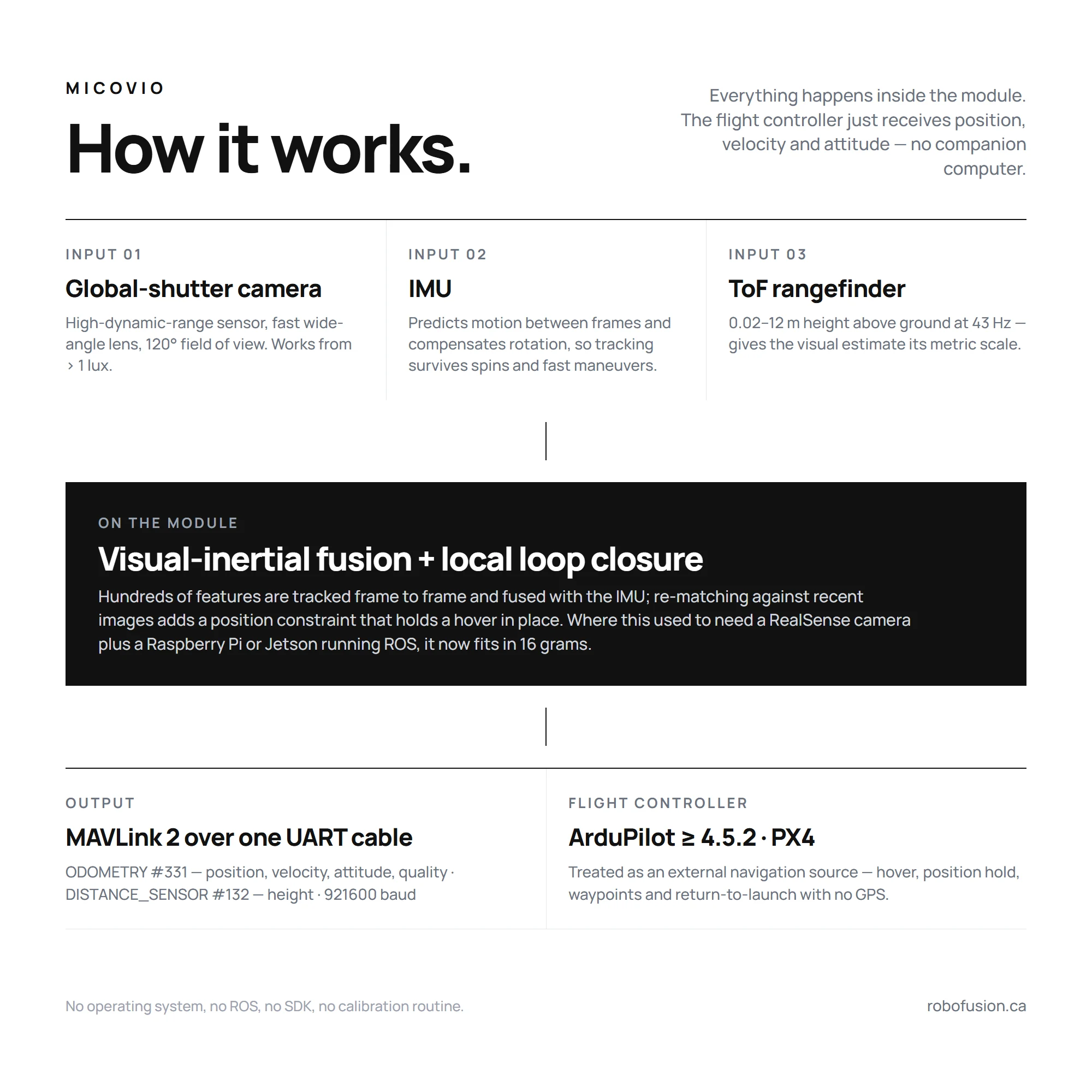
| Mounting | Facing down, white arrow toward the nose |
Operating temperature range, ingress protection, input-voltage tolerance and peak current, output latency and time-stamping, behaviour and recovery after losing track, and the mounting-hole pattern are not in the current datasheet. We have asked MicoAir and will add them here rather than guess; until then treat the module as an indoor / fair-weather device mounted with its own bracket.
¹ Typical 3D absolute trajectory error (ATE RMSE) divided by reference path length; varies with environment and motion. ² The height from which initialisation is allowed — not a guarantee of ToF or positioning accuracy at that height. ³ Ranging is affected by ambient light, target reflectivity, incidence angle and mounting.
Measured: outdoor trajectory vs RTK
MicoAir flew the module outdoors next to an RTK receiver and compared the two tracks. ATE is the RMS 3D distance between the MicoVIO trajectory and the RTK trajectory after rigid-body alignment, with no scale correction.
| Flight | Horizontal distance travelled | ATE | ATE as share of distance |
|---|---|---|---|
| 1 | ≈ 136 m | 0.73 m | ≈ 0.5 % |
| 2 | ≈ 141 m | 0.70 m | ≈ 0.5 % |
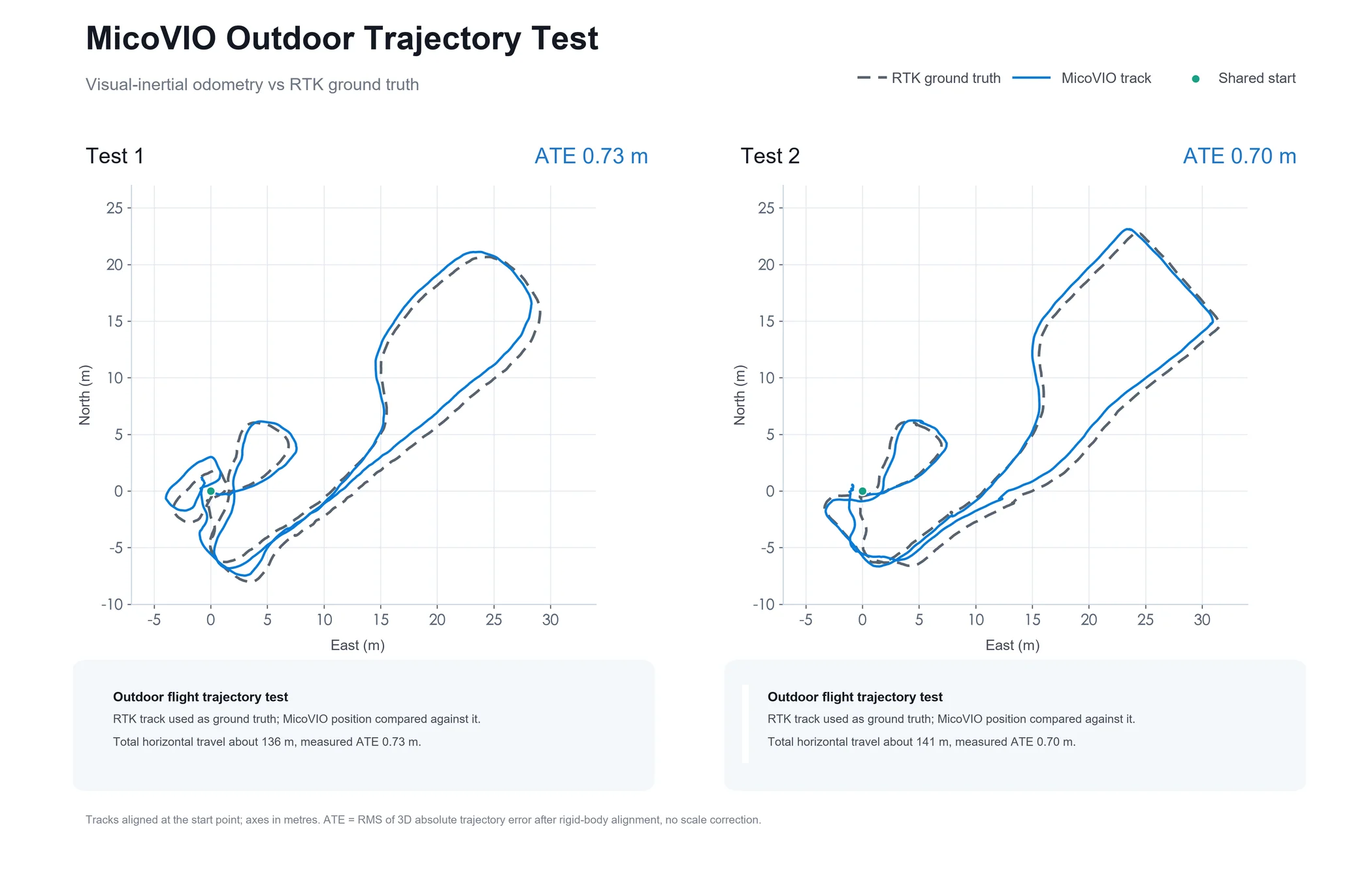
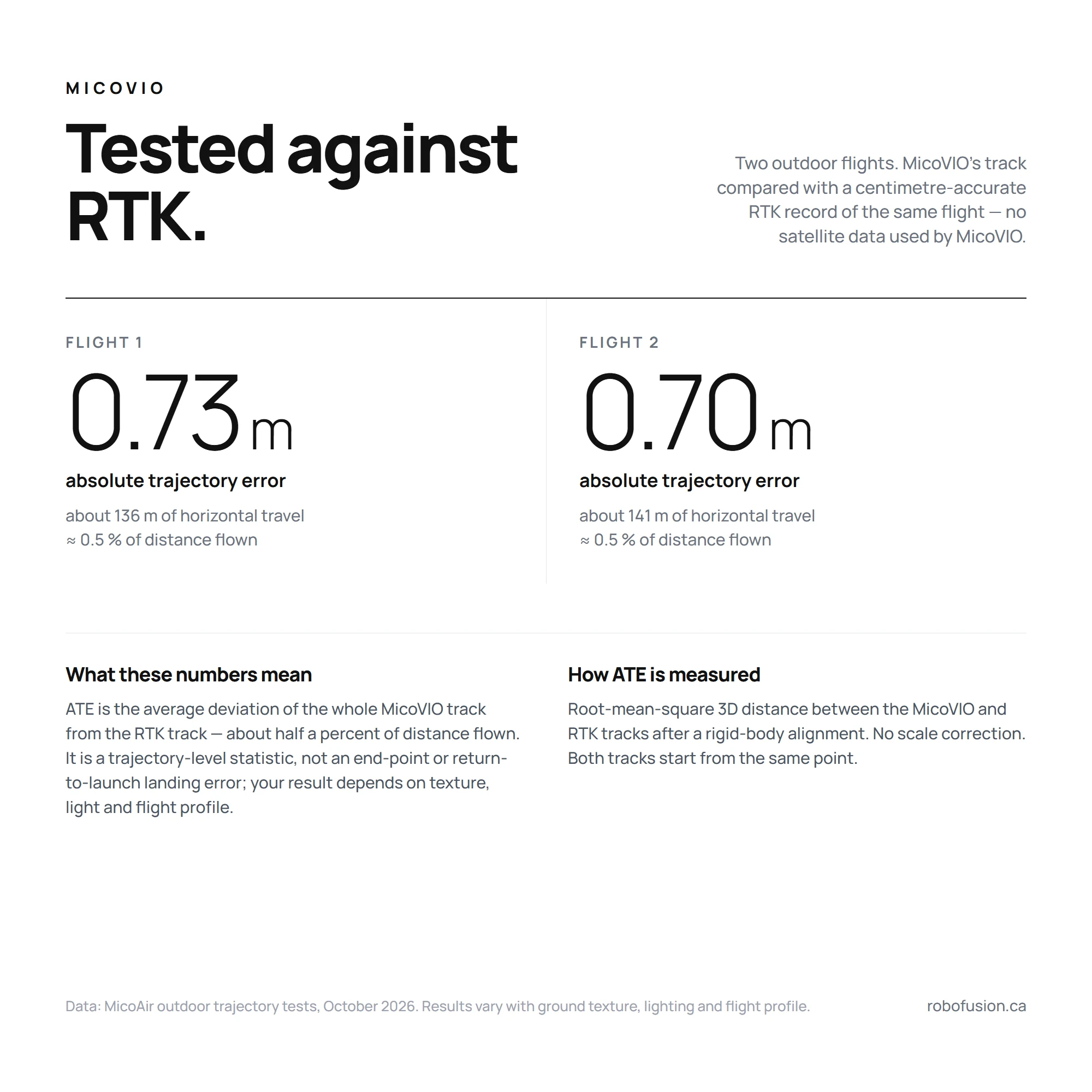
Read these as trajectory-level statistics. ATE RMSE describes how far the whole MicoVIO track deviated from the RTK track on average, after the two were aligned — it is not the end-point error, the maximum error, or a guaranteed return-to-launch landing accuracy. The honest summary is "about half a percent of distance flown, typical, in these two flights"; your own result depends on ground texture, lighting and flight profile. Return-to-launch without GPS is possible on firmware that supports external-navigation RTL, but we have not yet measured landing accuracy ourselves.
What's in the box
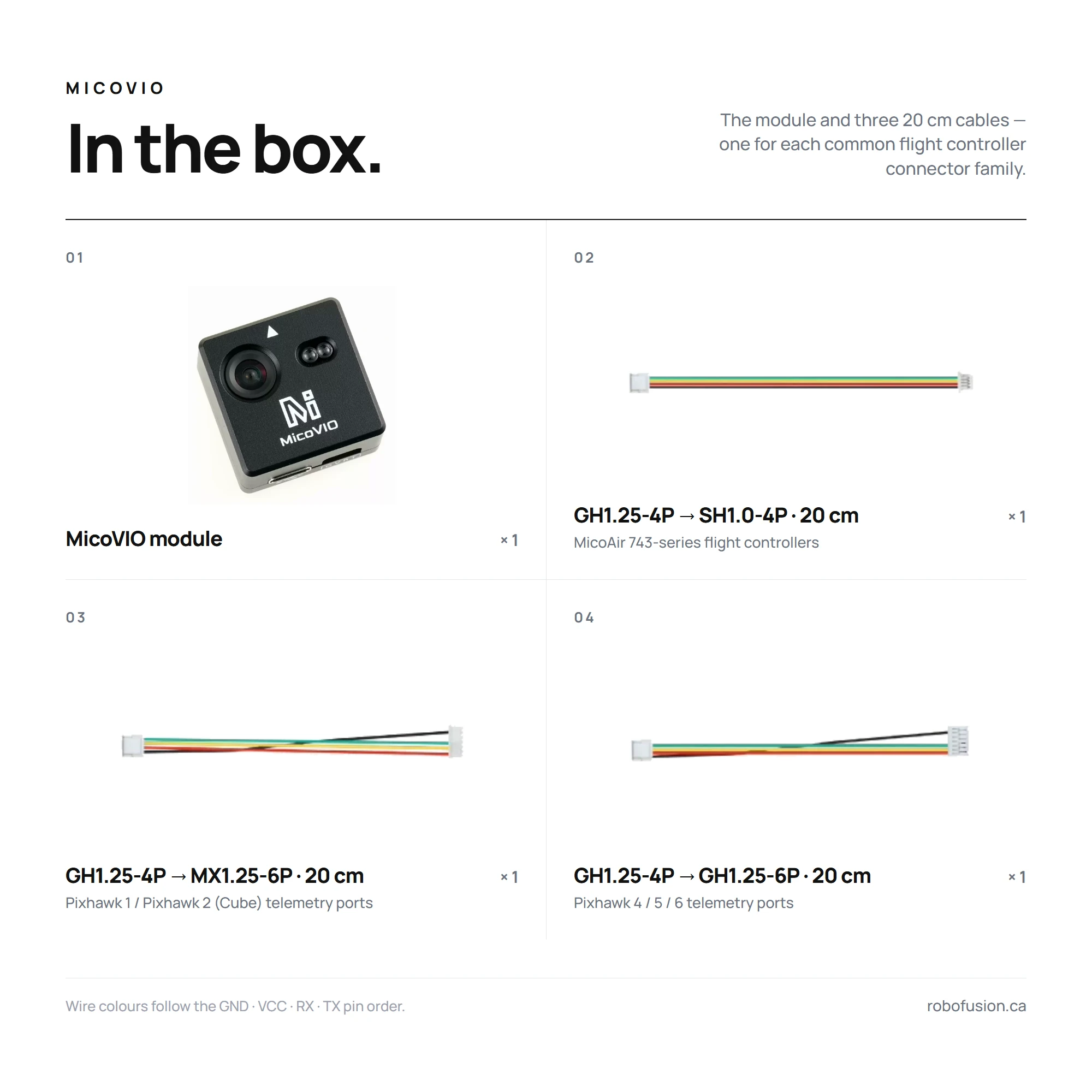
| Item | Qty | Fits | |
|---|---|---|---|
| MicoVIO module | 1 | — | |
| GH1.25-4P → SH1.0-4P cable, 20 cm | 1 | MicoAir 743-series flight controllers (H743 V2, H743 AIO) |  |
| GH1.25-4P → MX1.25-6P cable, 20 cm | 1 | Pixhawk 1 / Pixhawk 2 (Cube) telemetry ports | 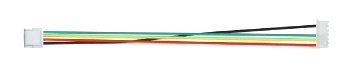 |
| GH1.25-4P → GH1.25-6P cable, 20 cm | 1 | Pixhawk 4 / 5 / 6 telemetry ports |  |
Dimensions & mounting
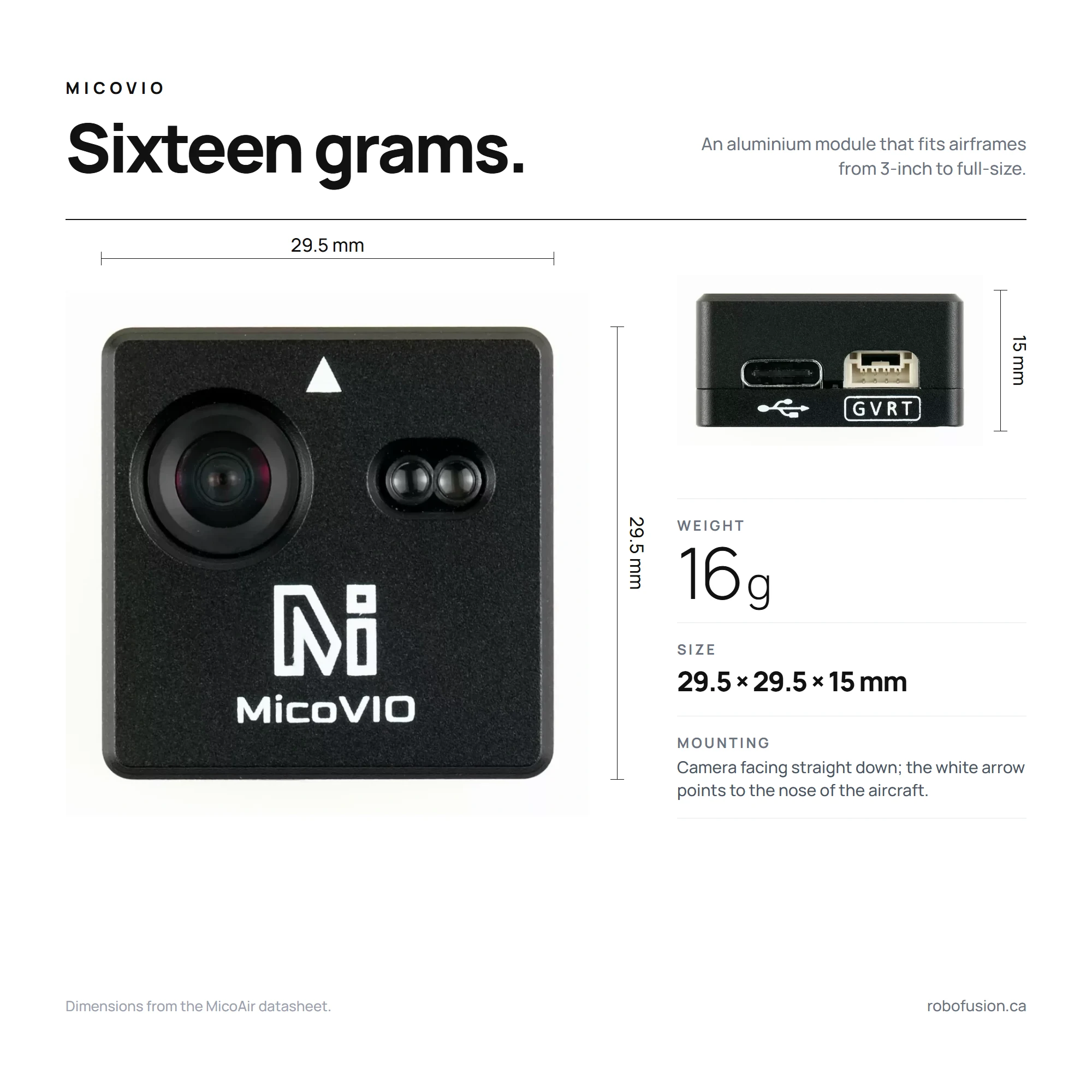
Mount the module camera facing straight down with the white arrow pointing to the nose of the aircraft, as rigidly as the flight controller itself — VIO fuses its own IMU, so a soft or wobbly mount hurts it exactly as vibration hurts the autopilot. Keep the lens and the two ToF windows clear of props, landing gear and cable ties, and do not let the ToF look at a nearby strut. The module boots in about 12 s; let it finish before arming.
Ports & pinout
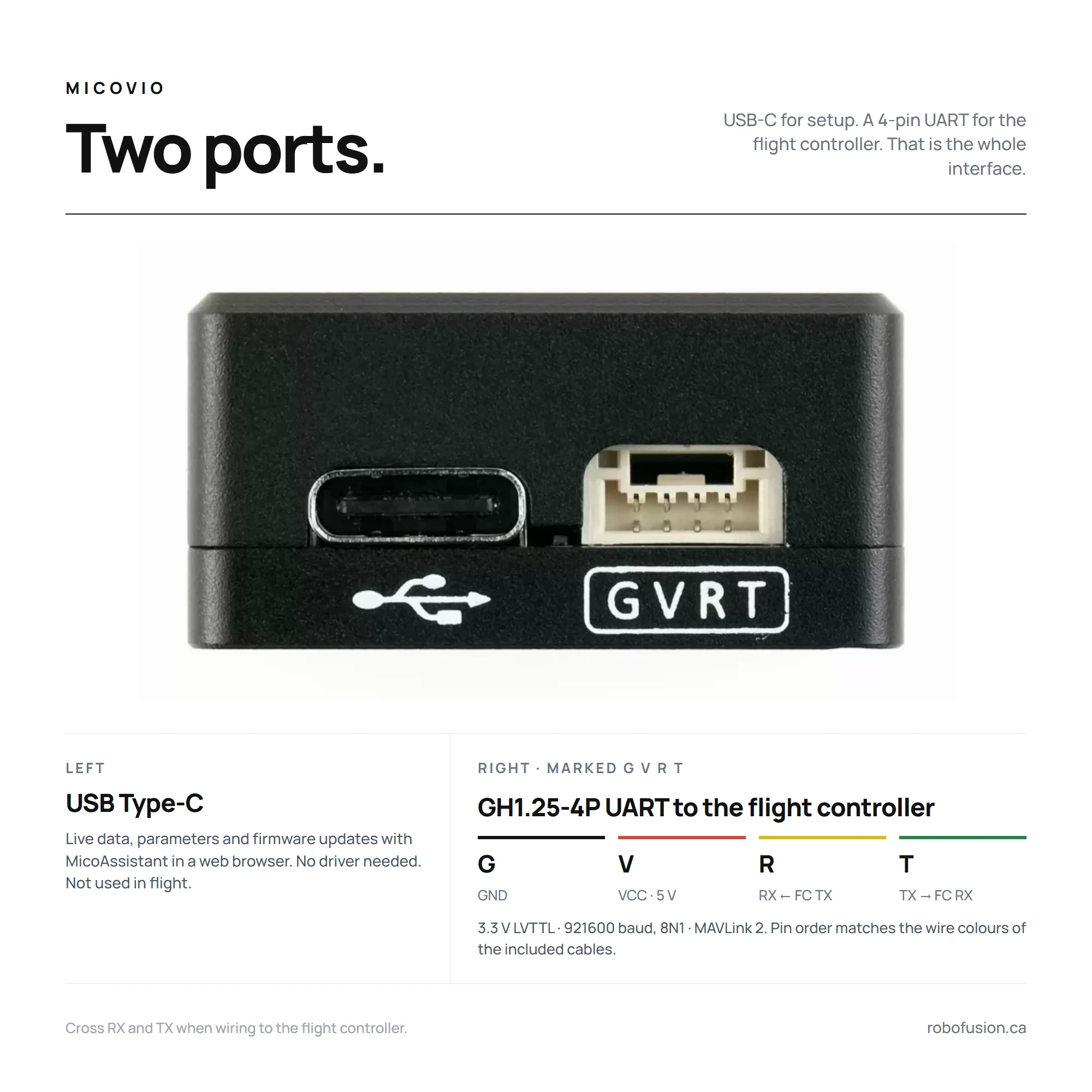
| Pin (case marking) | Signal | Connect to flight controller |
|---|---|---|
| G | GND | GND |
| V | VCC, 5 V | 5 V |
| R | RX (3.3 V) | UART TX |
| T | TX (3.3 V) | UART RX |
The USB Type-C port is for MicoAssistant — live data, parameters and firmware updates in a web browser; it is not needed in flight.
Wiring
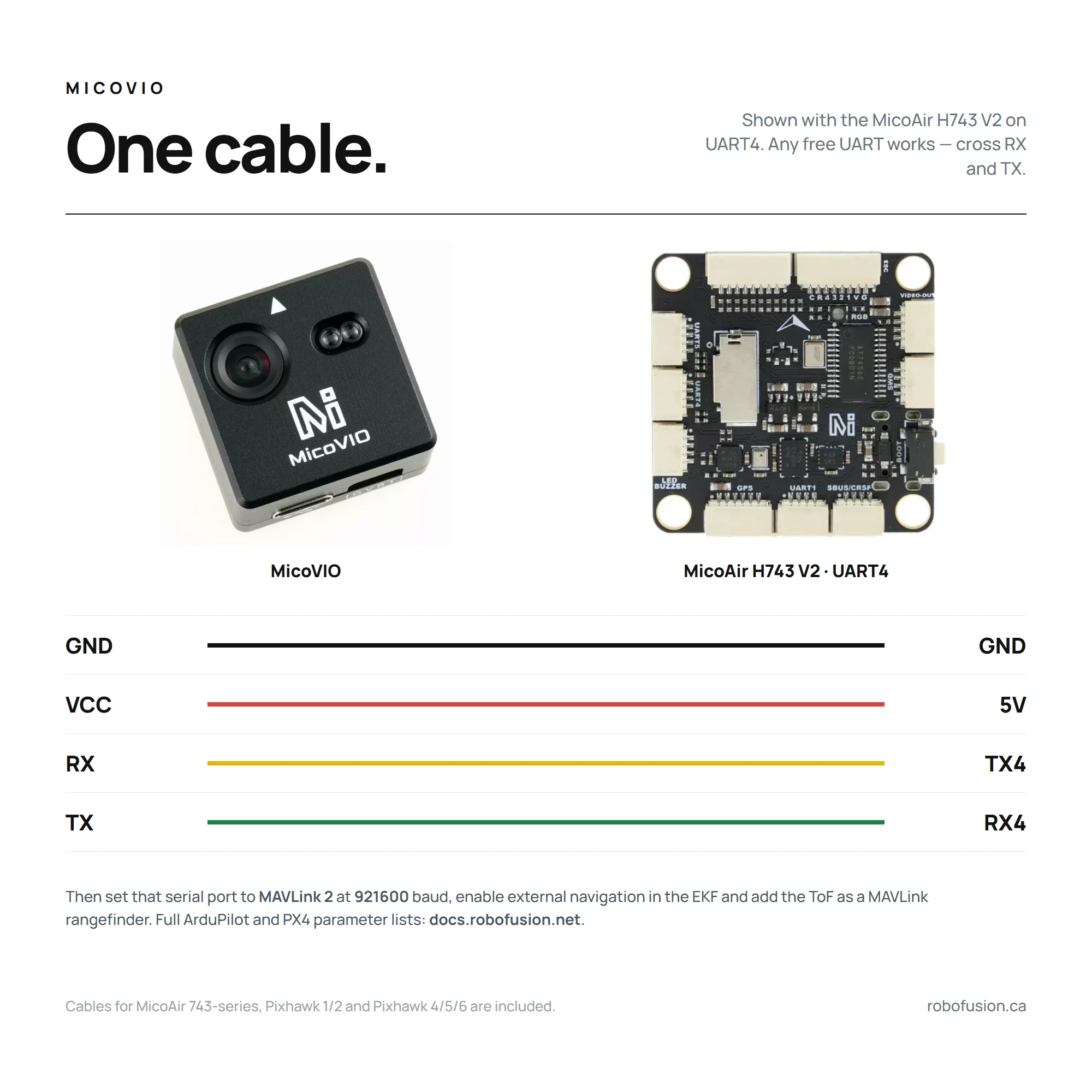
Any free UART works; the diagram shows UART4 on the MicoAir H743 V2. Cross RX and TX, power from a 5 V pad, and note which SERIALn (ArduPilot) or TELEM n (PX4) that port maps to in your flight controller manual or in MicoConfigurator's port page.
The flight controller firmware must include the visual-odometry / external-vision library. H7 boards do — H743 V2, H743 AIO and the NxtPX4 V2 are all fine. Most F405 boards do not (F405 V2, F405 Mini): ArduPilot builds for boards with less than 2 MB of flash normally leave VISO_TYPE out to save space.
Configuration — ArduPilot
Requires ArduPilot 4.5.2 or newer. MicoAir recommends doing this in MicoConfigurator, which exposes every parameter below on its Ports, Sensors → External Vision, Sensors → Rangefinder and EKF pages; Mission Planner's full parameter list works just as well.
The parameters and screenshots below come from MicoAir's manual, whose screenshots show ArduCopter 4.7.0 on a MicoAir743 (v3) and PX4 v1.17.0 on a MicoAir743 V2. Robofusion has not yet flown its own unit — the first batch is still in transit — so treat this page as the manufacturer's procedure, re-checked against the ArduPilot and PX4 documentation, not as our own flight test. We will add a tested-combinations table when units arrive.
1 — Serial port (x = the serial port MicoVIO is wired to, e.g. SERIAL4 for UART4 on the H743 V2)
SERIALx_PROTOCOL = 2       # MAVLink 2
SERIALx_BAUD     = 921     # 921600
SERIALx_OPTIONS  = 1024    # ArduPilot 4.6 and earlier: don't forward MAVLink on this port
MAVy_OPTIONS     = 2       # ArduPilot 4.7 and later: the same "don't forward" option, now per MAVLink channel
SERIALx and MAVy are two different numbersArduPilot numbers the MAVy_ parameter instances from MAV1, in the order of the serial ports configured for MAVLink — not by serial-port number. The first MAVLink port uses MAV1_ (normally SERIAL0, the USB port), the next uses MAV2_, and so on, so the y in MAVy_OPTIONS is usually not the x of your SERIALx port. In MicoAir's screenshot below, SERIAL1 is tagged MAV2, SERIAL4 is tagged MAV3 and SERIAL7 is MAV4 — so for MicoVIO on SERIAL4 the option lives in MAV3_OPTIONS on that board. Set SERIALx_PROTOCOL first, reboot, then read the MAV tag MicoConfigurator shows next to the port before touching MAVy_OPTIONS; don't copy MAV3 blindly. If the bitmask already has other bits set on your board, add bit 1 (value 2) rather than overwriting it.
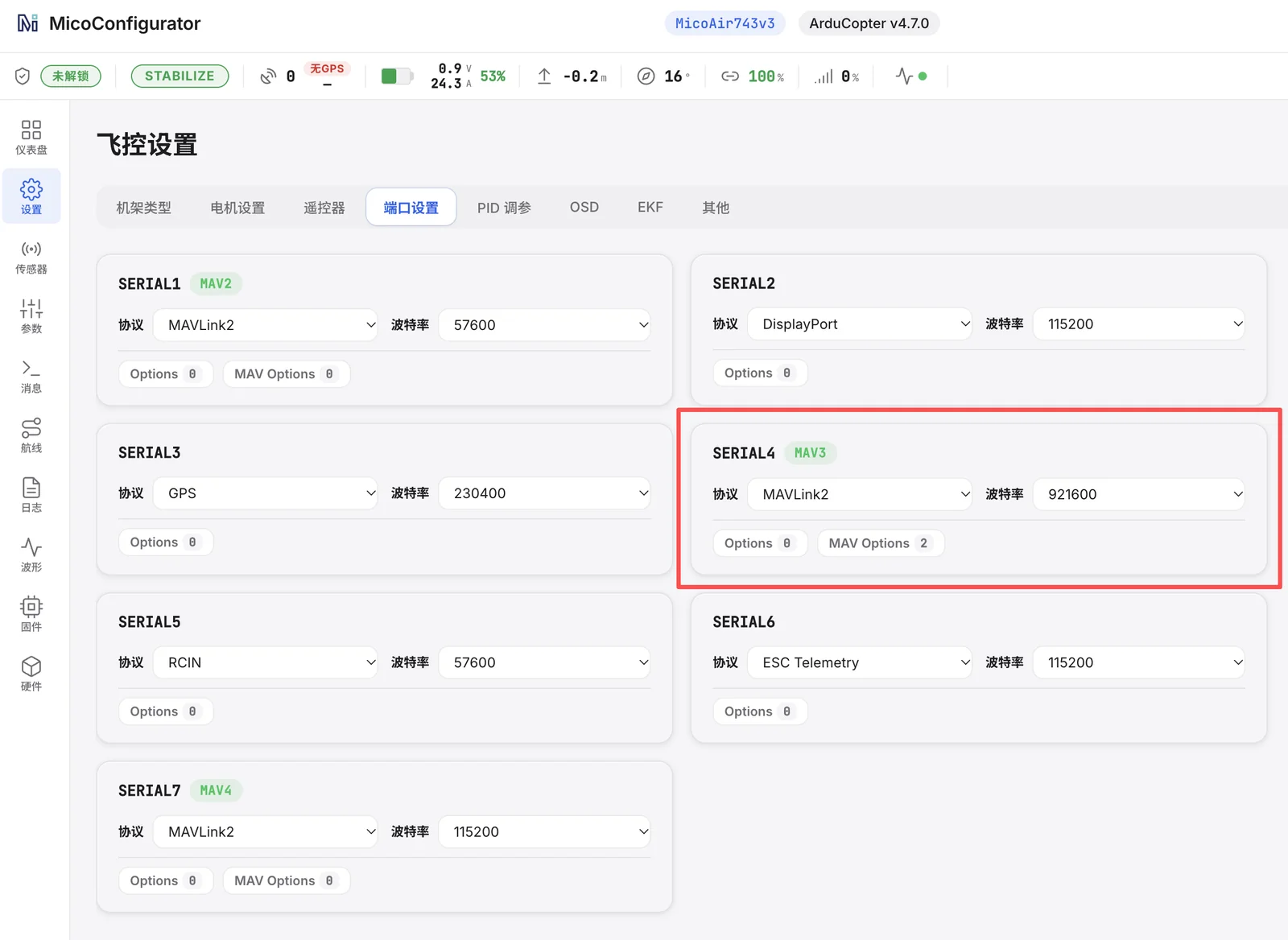 MicoConfigurator → Settings → Ports: SERIAL4 set to MAVLink 2, 921600, MAV Options 2 (ArduPilot 4.7). Note the
 MAV3 tag — this port is MAVLink channel 3. Screenshot from the Chinese UI; the English UI has the same layout.
2 — Visual odometry
VISO_TYPE      = 3         # ODOMETRY-message source (listed as "VOXL" in the parameter docs — the same message format)
VISO_YAW_M_NSE = 0.1
Leave the other VISO_ parameters at their defaults and reboot the flight controller.
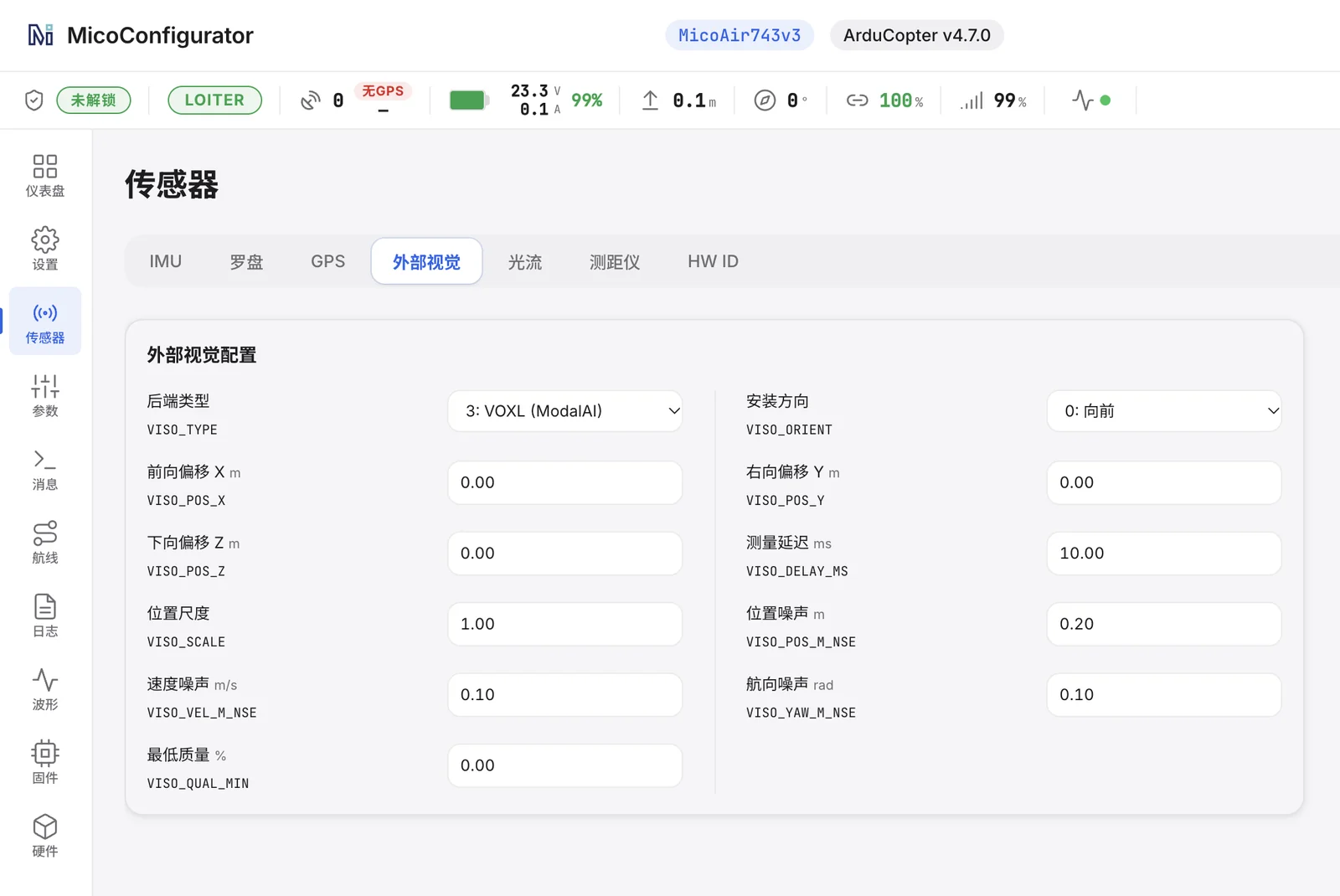 Sensors → External Vision:
 VISO_TYPE 3, VISO_YAW_M_NSE 0.10, everything else default.
3 — Rangefinder (the ToF arrives as a MAVLink DISTANCE_SENSOR)
RNGFND1_TYPE   = 10        # MAVLink
RNGFND1_MAX_CM = 1200      # ArduPilot 4.6 and earlier (centimetres)
RNGFND1_MIN_CM = 1
RNGFND1_MAX    = 12        # ArduPilot 4.7 and later (metres)
RNGFND1_MIN    = 0.01
RNGFND1_ORIENT = 25        # down
Reboot or refresh parameters after setting RNGFND1_TYPE.
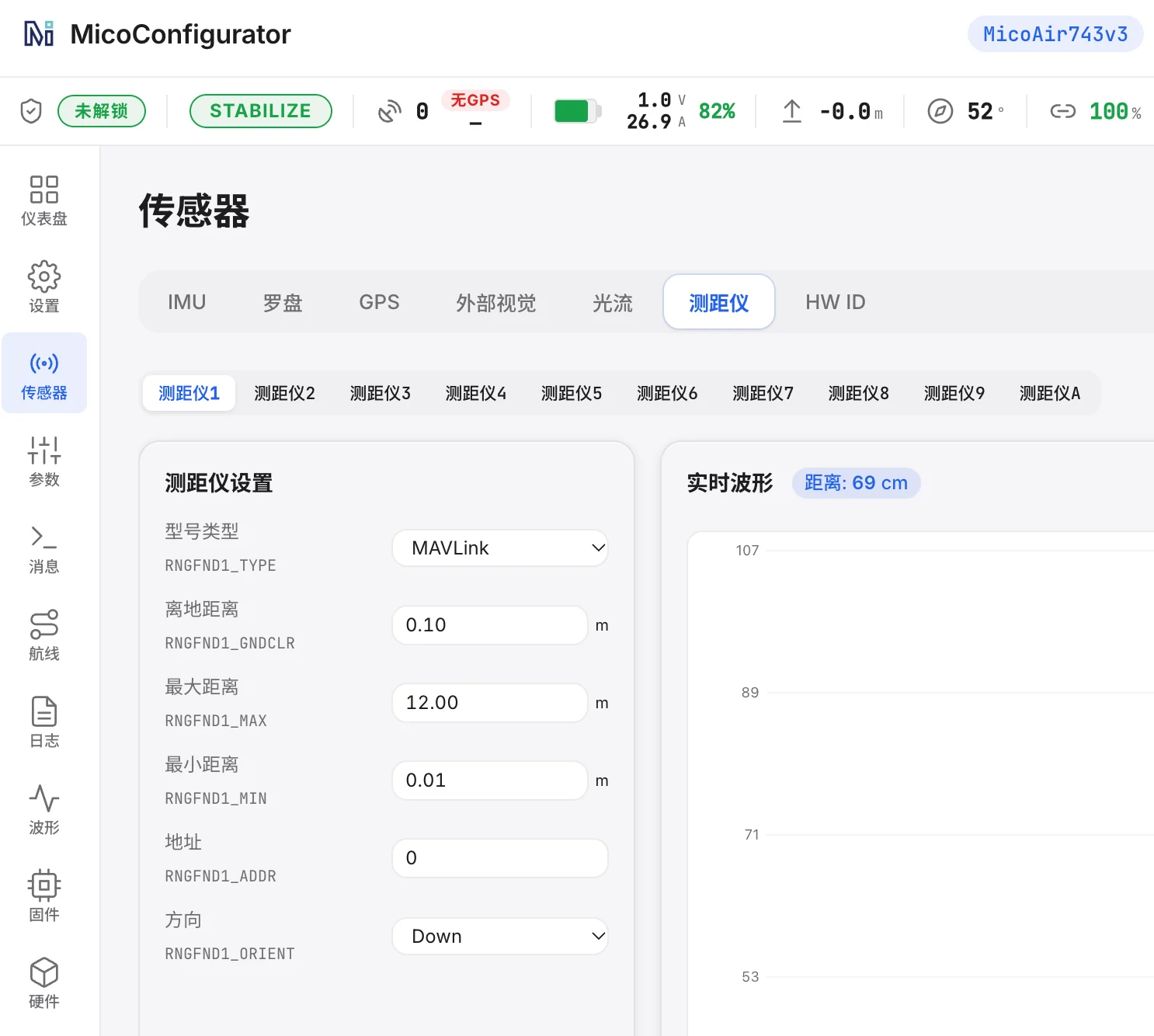 Sensors → Rangefinder: type MAVLink, 12 m / 0.01 m, orientation Down — the live waveform confirms the ToF is arriving.
4 — EKF sources
EK3_SRC1_POSXY = 6         # ExternalNav
EK3_SRC1_POSZ  = 2         # RangeFinder
EK3_SRC1_VELXY = 6         # ExternalNav
EK3_SRC1_VELZ  = 6         # ExternalNav
EK3_SRC1_YAW   = 6         # ExternalNav (or 1 = Compass if you fly with a good compass — keep VISO_TYPE = 3 either way)
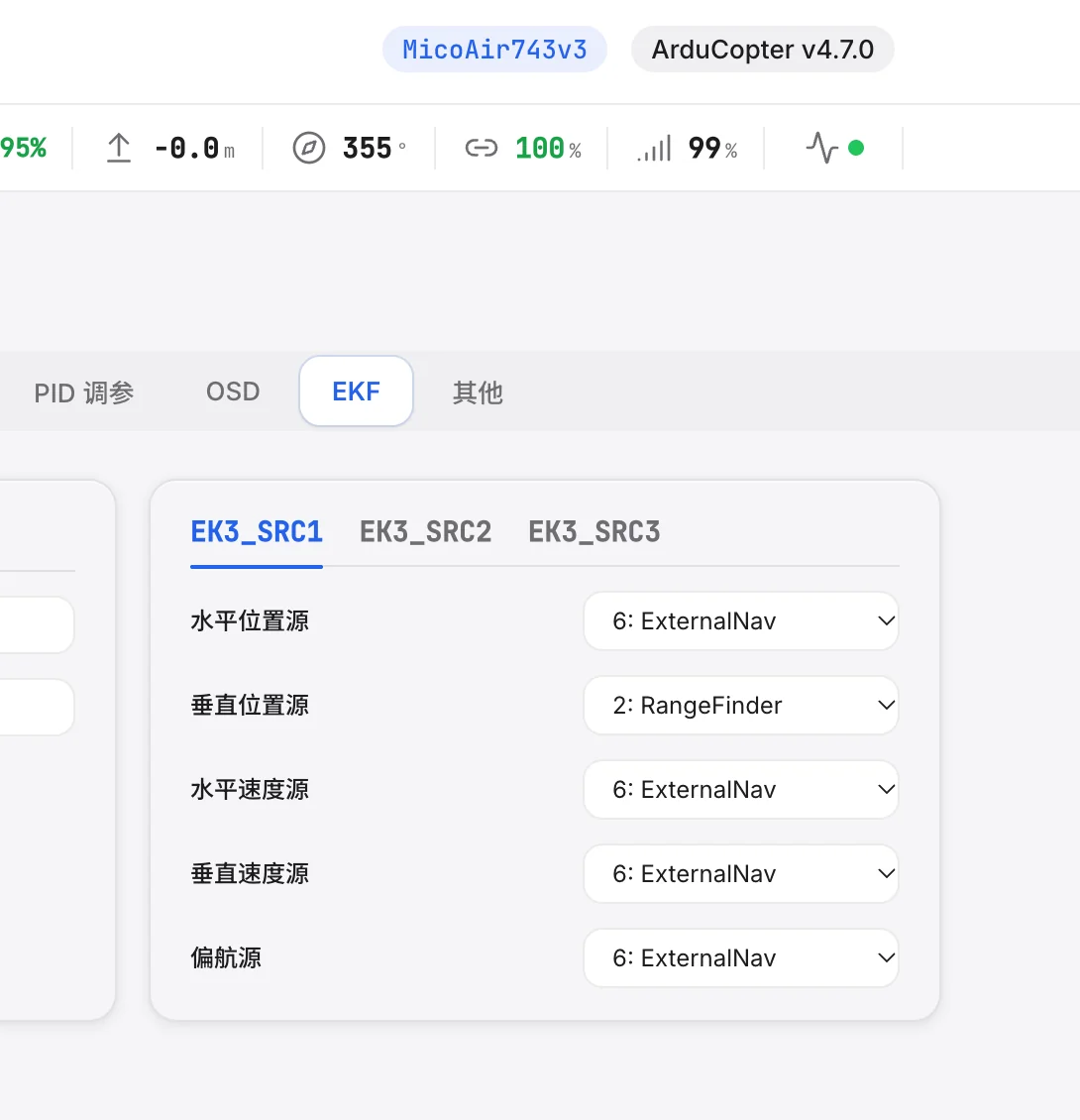 Settings → EKF → EK3_SRC1: horizontal position, horizontal velocity, vertical velocity and yaw from ExternalNav; vertical position from the rangefinder.
5 — Set the EKF origin (there is no GPS to do it for you)
Without GPS the EKF has no latitude/longitude reference and will not produce a position, however good the ODOMETRY stream is. After every boot, before arming, confirm an origin exists — and if nothing sets one automatically, set it yourself: connect Mission Planner, wait for the module to finish its ~12 s start-up, then right-click the map near your actual location and choose Set EKF Origin Here. This is not the same as Set Home Here: the EKF origin is the reference the estimator counts from, while Home — where RTL returns to — is a separate point normally set when you arm (ArduPilot explains the difference in Setting Home and/or EKF origin). If arming is refused, read the exact pre-arm message and fix the cause — usually a missing origin, a wrong EK3_SRC1_* source, or an estimator that is not yet healthy — rather than skipping checks; ArduPilot's pre-arm safety checks page lists each message and its remedy. Background: Non-GPS position estimation.
Check it — three layers, in order:
- Module alone. On USB, MicoAssistant shows tracking, a quality value and the position trace moving as you move the module (see Testing with MicoAssistant).
- Flight controller receiving. Because the MicoVIO port has MAVLink forwarding switched off, the sensor's
ODOMETRYmessages are not relayed to your ground station — Mission Planner's MAVLink Inspector will not show them, and that is normal. Look instead at MicoConfigurator's Sensors → External Vision page, Mission Planner's Messages tab forEKF3 IMU0 is using external nav data, or theVISP/VISVrecords in a dataflash log. - EKF using it. The HUD shows a position, the EKF status is healthy, and Loiter can be armed. Only then hover in Loiter over a textured floor; the aircraft should sit still without stick input.
Waypoints and RTL without GPS are a further step — fly and verify Loiter first; we will add a separate section once we have tested them.
Configuration — PX4
1 — Serial port (example: MicoVIO on TELEM 2)
MAV_1_CONFIG  = TELEM 2    # the port MicoVIO is wired to — reboot after changing
MAV_1_MODE    = Onboard
MAV_1_FORWARD = Disabled
SER_TEL2_BAUD = 921600 8N1
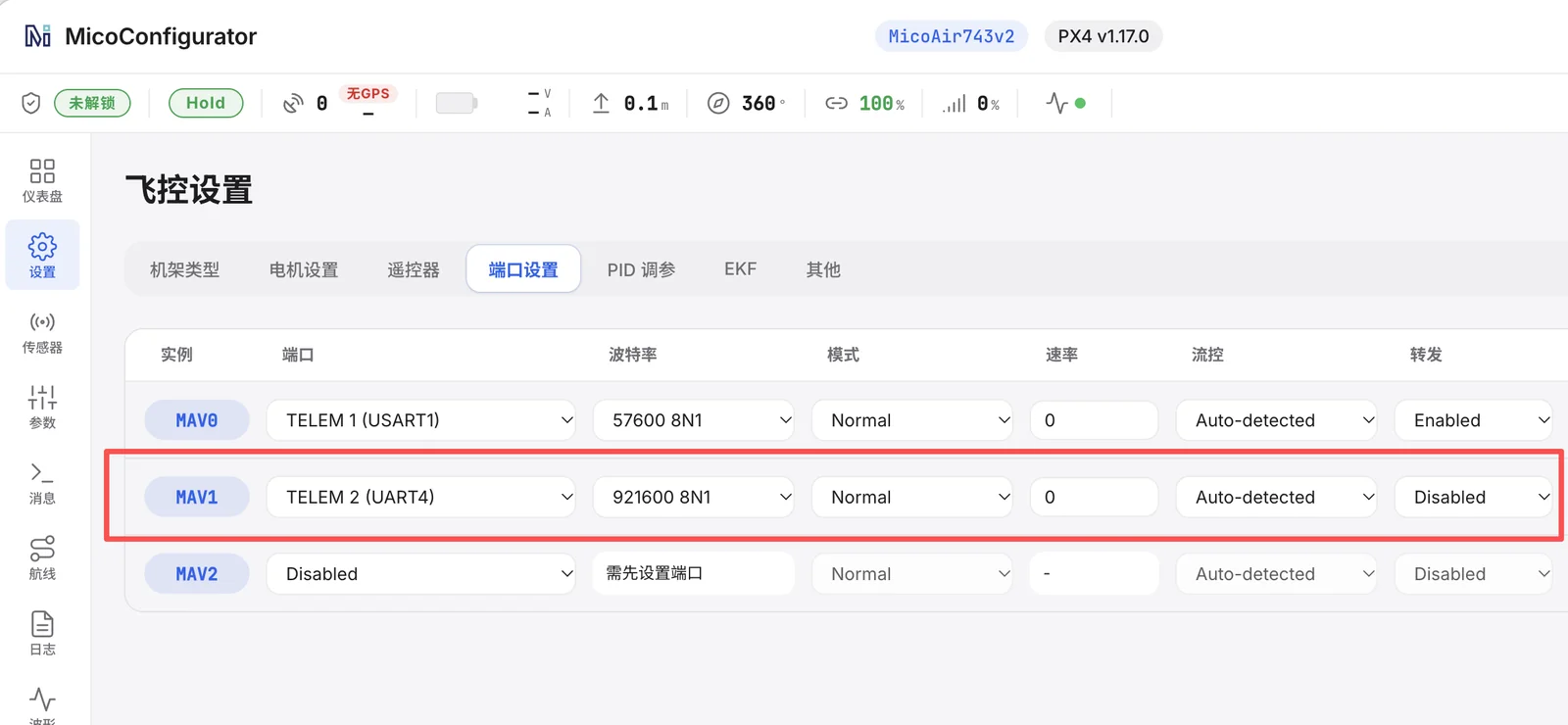 PX4 ports page: the MAV1 instance assigned to the MicoVIO UART (TELEM 2 / UART4) at 921600 8N1 with forwarding disabled. MicoAir's text specifies
 MAV_1_MODE = Onboard while this screenshot still shows Normal — follow the text; Onboard is the mode intended for a sensor or companion stream.
2 — EKF2
EKF2_EV_CTRL = 9           # bit 0 horizontal position + bit 3 yaw
EKF2_HGT_REF = 2           # Range sensor
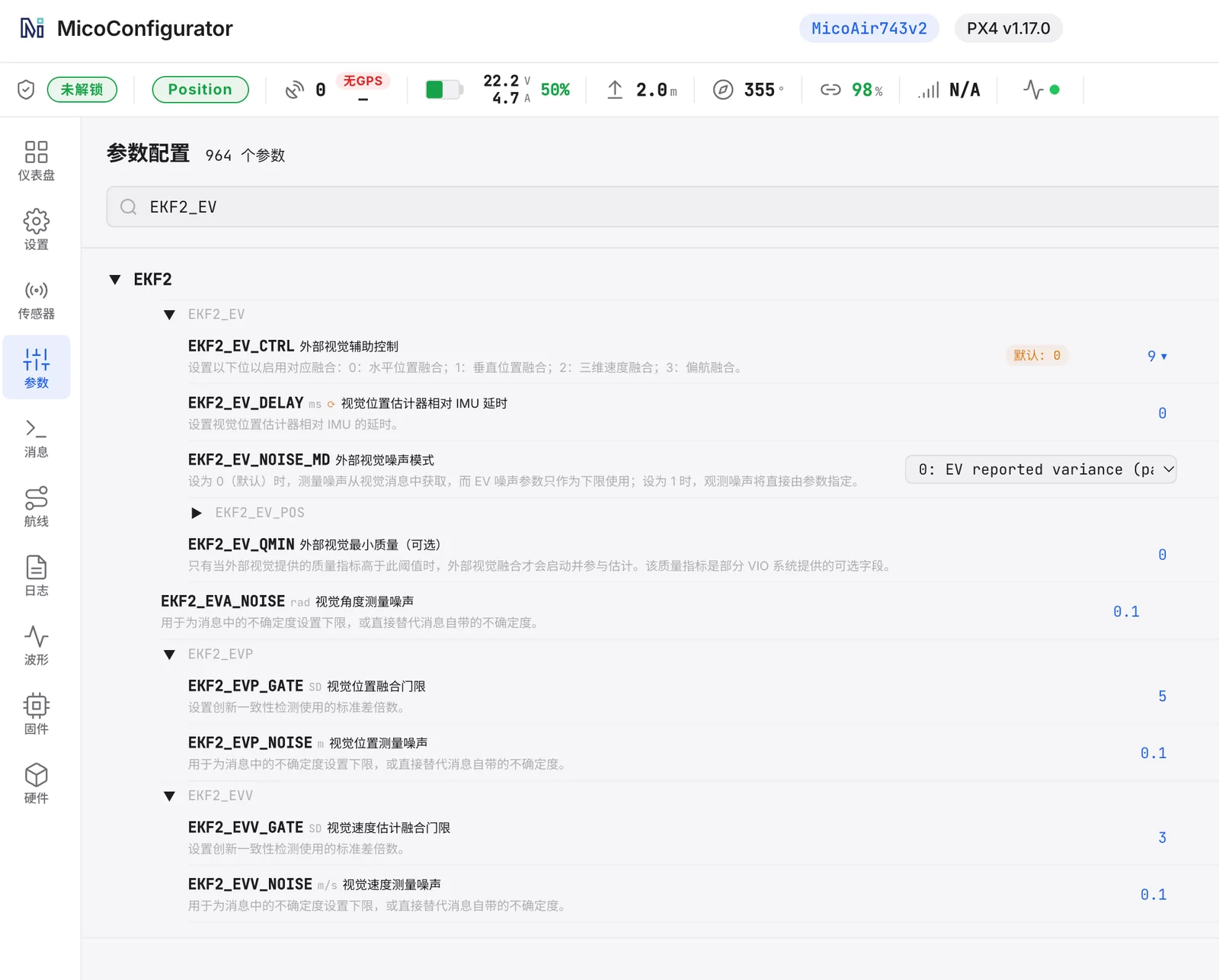 Parameters → search
 EKF2_EV: EKF2_EV_CTRL = 9; the other external-vision parameters stay at their defaults.
EKF2_EV_CTRL is a bitmask: 0 = horizontal position, 1 = vertical position, 2 = 3D velocity, 3 = yaw. MicoAir's recommended value 9 fuses horizontal position and yaw from the module and takes height from the ToF via EKF2_HGT_REF = 2; the module still sends velocity in ODOMETRY, but with this value the EKF does not fuse it. Check that EKF2_RNG_CTRL allows the rangefinder to be used, and verify in QGroundControl's MAVLink Inspector that ODOMETRY arrives at about 40 Hz (with MAV_1_FORWARD disabled it may not be relayed to QGC — check the EKF2 status and local position instead). PX4 flies Position mode on the local estimate without a global origin; missions and RTL need a global origin supplied over MAVLink, which we have not yet tested with this module.
Testing with MicoAssistant
Connect the USB Type-C port to a computer and open MicoAssistant in a Chromium browser — no driver is normally needed; pick the module's serial port and any baud rate. The Data page shows tracking state, VIO quality (0–100), receive rate, position, body-frame velocity, attitude and ToF distance, live waveforms and an XY trace of where the module thinks it has moved. Wave it over a textured surface and watch the trace follow your hand before you ever put it on an aircraft. Firmware updates are done from the same tool.
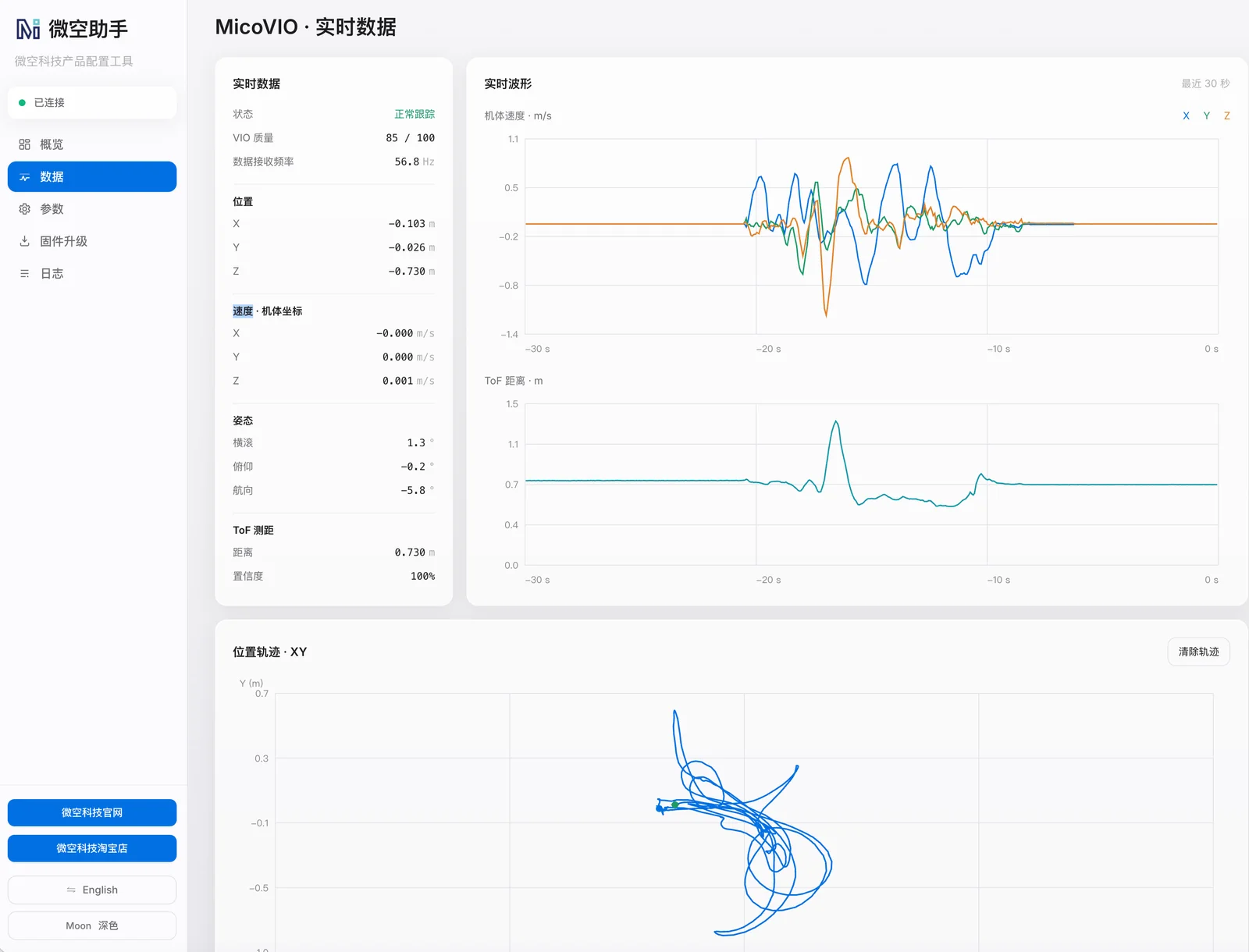 MicoAssistant → Data while the module is tracking: quality 85/100 at 56.8 Hz, position and velocity, ToF distance and the XY trace of the module's movement. Chinese UI shown; the English UI is identical.
Operating limits — read before the first flight
- Light: needs more than ~1 lux. Dim rooms are fine; a dark hangar is not — add a downward light and it will track in tunnels and mines.
- Texture: like any camera, it needs something to look at. A glossy uniform floor, still water or a perfectly plain carpet starve it of features. MicoAir specifies operation on low-texture and reflective floors and through hard lighting changes; that is a manufacturer claim we have not yet measured, so test your own floor before relying on it. A sensor that is standing still drifts very little — but standing still does not make loss of tracking impossible.
- Height — three different numbers: the module can initialise from 1 cm above ground (not a ranging-accuracy figure); its visual tracking is rated to 30 m depending on texture and light; and the ToF ranges to 12 m in shade, about 8 m in full sun. With
EK3_SRC1_POSZ = 2the EKF takes height from the ToF, a configuration ArduPilot documents for low-altitude flight — what the estimator does once the ToF is out of range depends on firmware version and parameters, and we have not validated it. Keep GPS-free flights within the ToF's working range until MicoAir or we publish a tested procedure, and read ArduPilot's EKF source selection page before using the barometer as the height source alongside external navigation. - Speed and rotation: 10 m/s typical at 2 m height, 60° tilt, 300°/s. It is designed to survive spins and "dish-pan" orbit flight that would blind an optical flow sensor.
- Boot: about 12 s to first data. Don't arm before the
ODOMETRYstream appears. - Accuracy is relative and grows with distance flown: about 1 % typical, quoted as an RMS error over the whole track. Loop closure keeps a hover tight; it does not make the sensor absolute, and position is always relative to where the module initialised. For centimetre-level absolute position outdoors you still want RTK.
FAQ
What is the MicoVIO and what does it do?
A 16-g module with a global-shutter camera, IMU and ToF rangefinder that fuses them on board and sends relative position, velocity and attitude to the flight controller as MAVLink 2 ODOMETRY. ArduPilot and PX4 drones can hover, hold position, fly waypoints and return to launch with it where there is no GPS.
How is it different from an optical flow sensor like the MTF-01? Optical flow gives the autopilot a horizontal velocity; position is integrated from it and drifts. MicoVIO estimates full 6-DoF motion directly, stays locked through fast rotation thanks to the IMU, and adds local loop closure so a hover does not wander. Typical trajectory error is about 1 % of distance flown. Full comparison: VIO vs Optical Flow.
Which flight controllers work? ArduPilot ≥ 4.5.2 and PX4 on boards whose firmware includes external-vision support — H7 boards such as the H743 V2, H743 AIO and NxtPX4 V2. Most F405 boards do not.
Do I need a companion computer or ROS? No. Everything runs inside the 16-gram module. The traditional way to get VIO on an open-source drone is either a stereo camera (Intel RealSense D435) plus a Raspberry Pi or Jetson running a VIO package under ROS, or the discontinued T265 plus a companion computer bridging its pose into MAVLink — several hundred dollars, well over 100 g, and days of integration either way. MicoVIO replaces all of that with one UART cable and a handful of flight controller parameters.
Does it work outdoors and in low light? Yes, within limits: rated from ~1 lux and, per MicoAir, in bright sun and on low-texture or reflective floors (claims we have not yet measured); visual tracking rated to 30 m, ToF ~8 m in full sun and 12 m in shade — stay within the ToF's range until a tested procedure for higher flight exists. Total darkness needs an added light.
Is MicoVIO a replacement for the Intel RealSense T265?
For most drone builders, yes. The T265 — discontinued by Intel — did the visual-inertial tracking itself but still needed a companion computer running a MAVLink bridge before ArduPilot or PX4 could use its pose. MicoVIO delivers the same kind of output, position, velocity and attitude from camera + IMU, straight to the flight controller as MAVLink 2 ODOMETRY, adds a ToF rangefinder for height and scale, and needs no computer in between. ArduPilot takes it through the external-navigation backend (VISO_TYPE 3) and PX4 through EKF2 external vision. See VIO vs Optical Flow for the full picture.
Is MicoVIO an obstacle-avoidance or mapping system? Treat it as an odometry sensor, not a perception system. The documented output is the aircraft's own position, velocity and attitude plus the height below it; local loop closure suppresses drift within one flight. MicoAir's current manual (October 2026) documents no obstacle detection, map export, image or depth stream, cross-session relocalisation, SDK or ROS interface — don't plan a purchase around those unless MicoAir confirms them. Obstacle avoidance needs separate sensors.
When can I buy it? First North American batch expected to reach our warehouse late October to mid-November 2026; orders ship after it arrives. Reserve by emailing info@robofusion.net — reserving costs nothing.
Related guides
- VIO vs Optical Flow — what's the difference?
- Optical Flow Setup Guide (MTF-01 / 01P / 02 / 02P) — the lighter, cheaper option for simple indoor hover
- MicoAir H743 V2 — User Manual · NxtPX4 V2 — User Manual
- ArduPilot Basic Configuration · PX4 Build & Configuration Walkthrough
- What Is RTK? — when you need absolute centimetre accuracy outdoors instead
References
- MicoAir, MicoVIO 视觉里程计用户手册 (Chinese, updated 15 Oct 2026) — the source of every specification, parameter value, screenshot and test figure on this page: https://micoair.cn/zh/docs/sensors/visual-inertial-odometry-sensor/micovio
- ArduPilot, Non-GPS position estimation (external navigation, EKF origin): https://ardupilot.org/dev/docs/mavlink-nongps-position-estimation.html
- ArduPilot, EKF source selection and switching: https://ardupilot.org/copter/docs/common-ekf-sources.html
- ArduPilot, Visual odometry (VISO) parameters: https://ardupilot.org/copter/docs/parameters.html#viso-parameters
- PX4, Using the ECL EKF — height sources and external vision: https://docs.px4.io/main/en/advanced_config/tuning_the_ecl_ekf
- PX4, External position estimation (vision/motion-capture): https://docs.px4.io/main/en/ros/external_position_estimation
- MAVLink, ODOMETRY (#331) and DISTANCE_SENSOR (#132) message definitions: https://mavlink.io/en/messages/common.html
What is manufacturer data, what is firmware documentation and what is Robofusion's own measurement is labelled as such throughout; until our first units arrive, nothing on this page is a Robofusion flight test.
Written and maintained by the Robofusion engineering team. Specifications from the MicoAir MicoVIO datasheet and user manual, 15 October 2026.